

Buzzcast is a mobile app that mixes live streaming, random one-on-one video chat, and short-form clips into a single social discovery platform.






It gives streamers a stage, gives casual users a quick way to meet strangers on camera, and ties both experiences together with a virtual gifting economy.
Last Updated: August 2026
What Is Buzzcast?
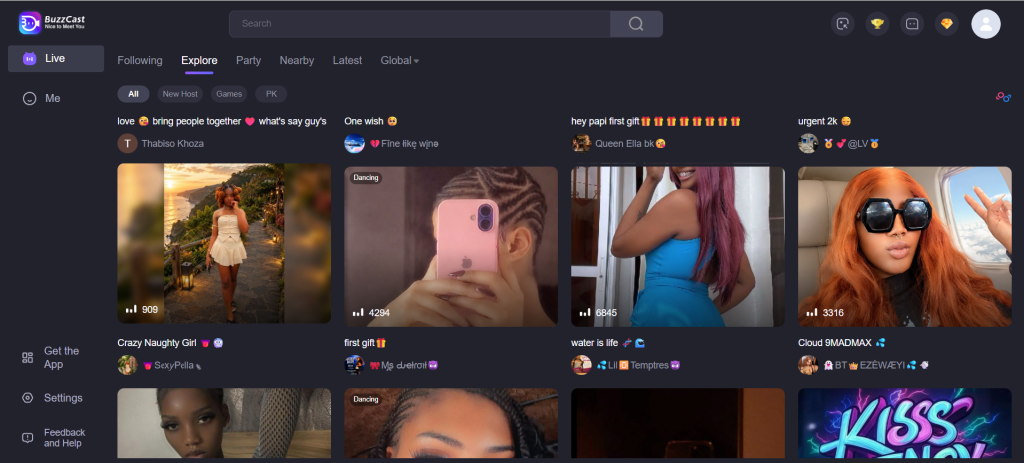
Buzzcast is a mobile-based social discovery app available on iOS and Android. It sits at the crossroads of a live streaming app, a random video chat service, and a short-clip sharing tool, which makes it different from single-purpose Omegle-style platforms. Users can broadcast to an audience, join a private one-on-one video chat with a stranger, or simply watch and comment on other people’s streams.
Because it blends several formats, Buzzcast is best understood as an app-based social chat platform rather than a strictly anonymous stranger-chat tool. Registration is required, profiles are visible, and a coin system sits behind most of the gifting and premium features.
How This Review Was Evaluated
This review looked at several factors before forming an opinion on Buzzcast:
- ease of getting started and whether registration is required
- how the app balances live streaming against one-on-one random chat
- clarity of the coin and gifting system
- privacy and safety tools available to users
- moderation approach for live and private chats
- mobile performance across iOS and Android
- how Buzzcast compares with similar mobile-first video chat apps
How Buzzcast Works
New users create an account using an email address, phone number, or a social login. Once inside, there are two main paths. The first is watching or hosting a live stream, where a broadcaster performs, chats, or shares daily life while viewers comment and send gifts. The second is the random chat mode, which pairs two users for a private, one-on-one video conversation similar to older stranger-chat sites.
Users can skip a chat partner at any time and move on to someone new. A text chat layer, complete with emojis and stickers, runs alongside the video feed for users who prefer typing. Short video clips can also be uploaded separately from live streams, giving the app a TikTok-style content feed on top of its chat features.
Key Features and Chat Tools
Buzzcast offers a mix of tools built around both broadcasting and one-on-one conversation:
- live streaming with real-time comments and gifting
- random one-on-one video chat with a skip option
- a virtual coin system used to buy and send gifts
- social profiles with photos, videos, and follower counts
- short-form video clips separate from live broadcasts
- text chat, emojis, and stickers alongside video
- optional filters for gender or location, which may require a paid tier
Is Buzzcast Safe and Legit?
Buzzcast is a legitimate, actively maintained app rather than a scam operation, and it uses automated tools to flag nudity, offensive language, and spam in real time. Flagged content is reviewed by human moderators, who can issue bans when the platform’s rules are broken. Reporting tools are also available for users who run into abusive or inappropriate behavior during a chat or stream.
That said, moderation on any platform that connects strangers over live video has limits, and no automated system catches every problem instantly. Users should treat the safety tools as a backup, not a guarantee, and should still use their own judgment before sharing anything personal.
Privacy and User Protection
Buzzcast requires basic registration, which means it is not a fully anonymous platform in the way some no-signup Omegle alternatives are. Users can control what appears on their public profile, and private conversations are not displayed anywhere else on the app. This setup gives a bit more accountability than fully anonymous chat rooms, though it also means less privacy for anyone who prefers to stay completely unidentified.
As with any camera-based chat platform, users should avoid sharing sensitive personal details such as addresses, workplace information, or financial data during a stream or private chat.
Pricing and Free Access
Buzzcast is free to download, and basic use, including watching streams, joining random chats, and browsing short clips, does not require payment. The monetization layer runs through an in-app coin system. Users buy coins with real money and spend them on virtual gifts for streamers, who can convert popular gifts into real income. Some premium features, such as filtering chat partners by gender or location, may sit behind this coin system or a paid tier.
Coin pricing and premium feature availability can change over time, so users should check current costs directly in the app before making a purchase.
User Experience on Mobile and Desktop
Buzzcast is built primarily for mobile, with a homepage that surfaces trending streams and quick access to random chat. The streaming interface uses a large video window with a live comment feed and a gifting bar running alongside it, while the chat interface keeps controls simple, with clear buttons for starting, skipping, or reporting a conversation.
Performance tends to hold up well on both Wi-Fi and mobile data, though like any live-video app, results can vary by connection quality and region. There is no dedicated desktop client, so users looking for browser-based access may want to compare it against other random chat apps that support desktop use.
Pros and Cons
Pros:
- free to download and use for core features
- combines live streaming, short clips, and random chat in one app
- gifting system gives streamers a way to earn income
- mobile-friendly with a large, global user base
- optional filters for gender and location preferences
Cons:
- coin purchases can add up quickly for active users
- moderation may not catch every piece of inappropriate content
- registration requirement means it is not fully anonymous
- gifting and skip mechanics can encourage heavy, habitual use
- no dedicated desktop version
Buzzcast vs Similar Chat Platforms
Buzzcast occupies a middle ground between pure streaming apps and pure random chat apps. Platforms like Azar and Monkey App focus almost entirely on quick one-on-one video matching, while Buzzcast layers a full streaming and gifting economy on top of that same chat format. This makes Buzzcast closer to a hybrid social app than a single-purpose Omegle alternative, and it may appeal more to users who also want to build a public profile or earn income from streaming.
Users who only want fast, no-frills random chat without a streaming layer might find a simpler Monkey App alternative better suited to that specific goal.
Comparison Table: Buzzcast
| Platform | Best For | Main Strength | Key Limitation |
|---|---|---|---|
| Buzzcast | Streaming plus random chat | All-in-one social format | Coin costs can add up |
| Azar | Quick video chat matching | Fast, filtered pairing | Filters often need payment |
| Monkey App | Casual random video chat | Simple, lightweight design | Skews toward younger users |
| Tango Live | Live streaming and gifting | Established creator economy | Less focus on 1-on-1 chat |
| MocoSpace | Mobile social chat | Group and community features | Less video-first than Buzzcast |
| Ablo | Cross-language random chat | Built-in translation tools | Smaller overall user base |
| FaceFlow | Browser-based video chat | No app install required | Interface feels dated |
Who Should Use Buzzcast?
Buzzcast works well for people who want variety in one app, whether that means streaming to an audience, joining quick one-on-one chats, or browsing short clips between conversations. It also suits users comfortable with account registration and a coin-based gifting system, especially anyone interested in building a following or earning through live content.
Who Should Avoid Buzzcast?
Users who want a fully anonymous, no-signup experience may prefer a simpler random video chat tool without a profile or gifting layer. People who dislike in-app purchases, or who find gamified skip-and-gift mechanics off-putting, might also be better served by a more stripped-down alternative.
Best Alternatives to Buzzcast
For users exploring options beyond Buzzcast, a few comparable live streaming and gifting platforms and random chat apps stand out:
- Azar
- Monkey App
- Tango Live
- MocoSpace
- Ablo
Each offers a different balance of streaming, chat speed, and community features, so the right fit depends on whether streaming, quick matching, or language-focused chat matters most.
Safety Tips for Using Random Chat Platforms
- avoid sharing full names, phone numbers, addresses, or workplace details early on
- be cautious about clicking links sent by strangers during a chat
- leave a conversation quickly if it becomes uncomfortable or inappropriate
- use the app’s block and report tools whenever something feels off
- remember that gifting involves real money, so spend with a clear budget in mind
- review current age requirements and account terms directly in the app before signing up
FAQs: Buzzcast
What is Buzzcast? Buzzcast is a mobile app that combines live streaming, random one-on-one video chat, and short video clips, along with a coin-based gifting system.
Is Buzzcast free to use? Yes. Downloading the app and using core features like watching streams and joining random chats is free, though gifting and some premium filters use paid coins.
Does Buzzcast require registration? Yes, users need to sign up with an email, phone number, or social login before using the app, which makes it less anonymous than some stranger-chat alternatives.
Is Buzzcast safe? Buzzcast uses automated moderation for nudity and offensive language, along with human review and reporting tools, though no platform can guarantee complete safety with strangers on camera.
Can users chat anonymously on Buzzcast? Not fully. Profiles are tied to a registered account, so the experience is more identity-linked than fully anonymous chat rooms.
How does the coin system work on Buzzcast? Users buy coins with real money and spend them on virtual gifts for streamers, who can convert popular gifts into income; current pricing should be checked in the app.
Does Buzzcast offer random video chat? Yes, alongside live streaming, Buzzcast includes a one-on-one random video chat mode with a skip option for moving to a new partner.
Is Buzzcast suitable for adults? Buzzcast is generally used by a broad adult audience, with reported use skewing toward younger adults, though it is not marketed as an adult-content platform.
Does Buzzcast work on mobile? Yes, Buzzcast is built primarily for iOS and Android, with no dedicated desktop client currently available.
How does Buzzcast compare with similar chat platforms? Buzzcast blends streaming and gifting with random chat, which sets it apart from single-purpose apps like Azar or Monkey App that focus mainly on quick video matching.
What are the best alternatives to Buzzcast? Azar, Monkey App, Tango Live, MocoSpace, and Ablo each offer a different mix of streaming, chat speed, or language tools.
What should users avoid sharing on Buzzcast? Users should avoid sharing personal details such as home addresses, financial information, or workplace details during streams or chats.
Does Buzzcast have moderation? Yes, it uses AI detection for nudity and offensive language alongside human moderators who review flagged content and issue bans when needed.
Can users filter chat partners by gender or location on Buzzcast? Yes, though these filters may require a paid tier or coins, depending on current app settings.
What is the best way to stay safe on Buzzcast? Keep personal information private, use the block and report tools when needed, and set a clear budget before spending on coins or gifts.
Final Verdict: Buzzcast
Buzzcast is best suited to users who want more than a single-purpose chat app. Its combination of live streaming, random video chat, and a gifting economy makes it a flexible option for both casual viewers and aspiring streamers, and its moderation tools offer a reasonable baseline of protection. The trade-off is a registration requirement and a coin-based system that can add cost for active users, along with the same underlying risks that come with connecting strangers over live video. For anyone comparing options in this space, Buzzcast stands out as one of the more feature-rich choices, while alternatives like Azar or Monkey App remain worth a look for a simpler, chat-only experience.